
Direct Lake vs Import vs DirectQuery in Power BI: Which Should You Choose?
Power BI gives you more than one way to connect to data—but choosing the wrong storage mode can quietly undermine everything else you build. Slow reports, unexpected capacity costs, complex refresh pipelines, and last-minute redesigns are often not modelling problems at all—they’re storage mode decisions made too early, or by habit.
With Microsoft Fabric introducing Direct Lake, many teams are asking whether Import and DirectQuery are becoming obsolete—or whether the reality is more nuanced. In this post, we’ll break down how Import, DirectQuery, and Direct Lake really differ, where each one shines, and how to choose the right mode before performance or governance issues force your hand.
What Are Power BI Storage Modes?
Import Mode
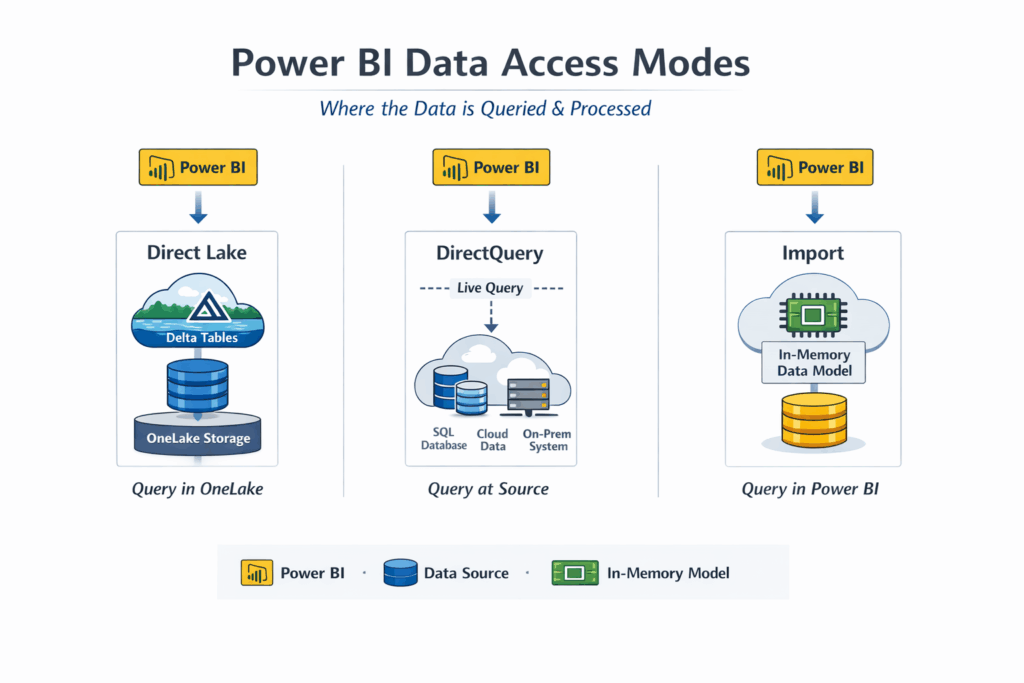
Is the traditional Power BI approach. Data is extracted from the source system and loaded into Power BI’s in-memory engine (VertiPaq). This delivers excellent performance and rich modelling capabilities, but at the cost of data duplication, scheduled refreshes, and potential latency between the source and the report.
DirectQuery
Leaves data in the source system and queries it in real time. Power BI acts as a query translator rather than a storage engine. This avoids duplication and supports strict compliance requirements, but performance depends heavily on the source system, query complexity, and network latency. Modelling flexibility is also more limited.
Direct Lake
Is a Microsoft Fabric innovation that allows Power BI to query Delta tables stored in OneLake directly—without importing data into VertiPaq and without issuing live queries back to a database engine. When conditions are right, it can deliver near in‑memory performance when models, tables, and capacity are designed appropriately while keeping data centralized in the lake. However, it relies on Fabric capacity, supported table formats, andmay fall back to DirectQuery‑like behaviour (for example when unsupported features are used or capacity is constrained).
Key Differences at a Glance
| Feature | Direct Lake | DirectQuery | Import |
|---|---|---|---|
| Data Location | OneLake (Delta tables) | External source (SQL, etc.) | In-memory Power BI dataset |
| Refresh Needed | No (data-level) | No | Yes |
| Performance | High (when optimized) | Variable / often lower | Very High |
| Data Duplication | No | No | Yes |
| Ideal Use Case | Large Fabric datasets, low‑latency analytics on frequently updated data | Live transactional systems, strict data residency | Smaller or static datasets |
These comparisons reflect typical patterns, not guarantees. Performance and behaviour still depend on data model design, capacity sizing, and how features are used.
When to Use Each
Use Direct Lake when
Your data already lives in a Fabric Lakehouse or Warehouse, you’re working with large datasets, and you want to minimize duplication without sacrificing performance. Direct Lake is especially powerful for analytics-first architectures where OneLake is the single source of truth. It works best when you design with Fabric in mind from the start.
Use DirectQuery when
Data must remain in the source system for regulatory, security, or operational reasons. This is common with transactional systems where duplication is prohibited or where near-instant consistency is mandatory. DirectQuery still plays a critical role—but it requires careful modelling and realistic performance expectations.
Use Import when
Datasets are relatively small, refresh windows are acceptable, and maximum performance and modelling flexibility are priorities. Import remains unmatched for complex calculations, offline scenarios, and highly interactive reports where latency must be minimal.
Architecture Perspective
Each storage mode represents a different philosophy of where computation happens:
- Import shifts compute into Power BI
- DirectQuery pushes compute back to the source
- Direct Lake meets the data where it already lives in OneLake
Conclusion
Direct Lake isn’t just a new feature—it’s a signal that Power BI architecture is shifting toward lake-centric analytics. If you’re building on Microsoft Fabric, defaulting to Import without reconsideration may already be a missed opportunity.
That said, no single mode wins everywhere. DirectQuery remains essential for compliance-heavy systems, and Import is still unbeatable for smaller, performance-critical models. The key is intentional design: choose your storage mode early, align it with your data architecture, and let performance, governance, and scale work together instead of against each other.
The right storage mode won’t fix a bad model—but the wrong one can quietly break a good one.

